
Print modules
PX QS
ROXI / IXOR labeling heads with PX QS print modules
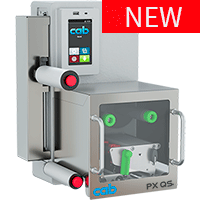


Perfect in function, highly reliable, convenient to operate and easy material changeover
The print modules have been specifically designed for adding to labeling heads. Any installation is possible.
- For label lengths up to 300 mm
- Minimal material waste thanks to compact design and programmable loop length
- Low mounting depth
114 mm from the label edge to the rear panel of the print module
1 Label sensor detecting transparent labels
2 Power supply and interfaces are located lateral, opposite the loop control.
All print modules are available for providing labels either to the left or right.
Printed labels are led through a deflection roller to a loop.
An integral control system monitors a loop fill level regardless of a speed in which labels are dispensed. Loop lengths can be set specifically to an application.
- Minimum loop length
When printing with continuous speed, provided that a cycle for applying a label takes longer than printing. Minimum label waste at batch changeovers - Maximum loop length
When items are labeled intermittently at frequent intervals. Filled buffer enables fast labeling. The print unit may refill the buffer at gaps between labeling cycles.

Universal ones
| Print module | PX QS 4.3 | PX QS 4 | ||
|---|---|---|---|---|
| Print resolution dpi | 203 | 300 | 300 | 600 |
| Print speed mm/s max. | 300 | 300 | 300 | 150 |
| Print width mm max. | 104 | 108.4 | 105.7 | 105.7 |
Wide ones
| Print module | PX QS 6.3 | |
|---|---|---|
| Print resolution dpi | 203 | 300 |
| Print speed mm/s max. | 250 | 250 |
| Print width mm max. | 168 | 162.6 |
The control system continuously monitors the fill level and provides early notification if buffer is “full” or “empty”. This ensures nondisruptive dispensing.
Labels can be printed in thermal transfer or direct thermal method.
The print head can be lifted during label feed:
- Consumption of ribbon is reduced in thermal transfer printing.
- In direct thermal printing, a print head benefits from extended service life.
- In addition, labels are prevented from compression between the sensor and the print head.
Units for linerless materials are available upon request
Want to learn more?

Ask for an offer free of charge and without obligation:
Learn more:

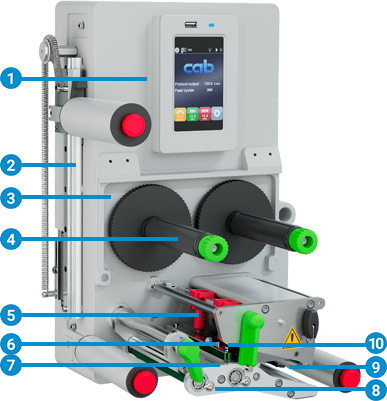 1 Operation panel
Operating the device is intuitive and simple with the help of self-explanatory symbols to configure settings
2 Smart loop buffer
It enables transport speeds been selected independent of the print speed on a labeling head. Required loop lengths are set automatically.
3 Rugged metal chassis
Cast aluminum construction resistant to torsion is the base to assemble all components of the print mechanics.
4 Ribbon holder
Three-part tightening axles enable the ribbon to be replaced quickly and easily.
5 Plungers
One plunger is fixed on the inner side. A second one is moved that far to the label margin, until a good print image evokes.
6 Print head
All print heads are freely interchangeable at equal width. Easy replacement in few steps
7 Print roller replacement
Both print and deflection rollers are easy to remove and reinstall in cases of cleaning or replacement due to wear.
8 Easy material changeover
Label materials are loaded from the side as far as they reach the stop. The print head and the draw roller are locked in place using levers.
9 Label sensor
A gap sensor or a reflective sensor position the imprint precisely on the label and detect the end of the material. An external label sensor (e.g. CEON) can be installed when processing transparent labels.
10 Automatic ribbon saving
installed as a standard
Operation panel
Operating the device is intuitive and simple with the help of self-explanatory symbols to configure settings
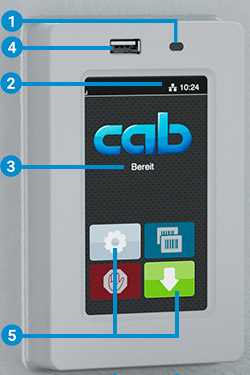
1 LED signal: Power ON
2 Status bar: data reception, record data stream, prior ribbon warning, SD memory card / USB stick plugged, WLAN, Ethernet, USB slave, time
3 Printer status: Ready, Pause, number of labels printed in a print job, label ready for removal, awaiting external start signal
4 USB slot to connect the Service Key or a memory stick, in order to transfer data to the IFFS memory
5 Operation
 Print label
 Jump to menu
 Reprint last label
 Interrupt and continue print job
 Stop and delete all print jobs
 Label feed
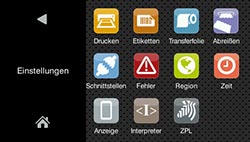
Setup options
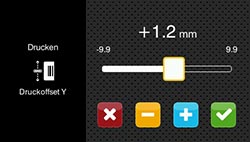
Print position Y
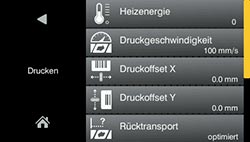
Print parameters
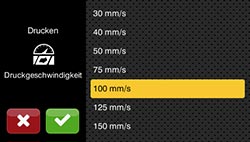
Print speeds
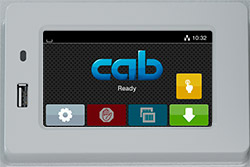
Depending from the orientation of assembly, display is either in landscape or portrait mode.
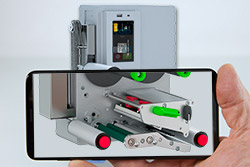
Video tutorials
Print heads
providing automatic ribbon saving as a standard
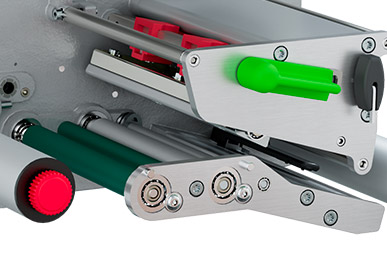
All print heads are freely interchangeable at equal width. They are automatically detected and calibrated by the CPU. The print distance to the locating edge can be adjusted.
Major data such as running performance, maximum operating temperature and heat energy are directly stored in the print head. The data can be read at the plant.
Print heads for PX QS 4 module - 300, 600 dpi
providing sharp-edged print images
suitable for small fonts and graphics on typeplates
suitable for markings on materials with high energy needs
Print heads for PX QS 4.3 and PX QS 6.3 modules - 203, 300 dpi
durable; suitable for rough surroundings and direct thermal printing
Print rollers
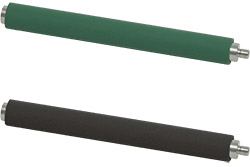
Two types of material:
Standard: DR print rollers
Coating: synthetic rubber
They suit for highly accurate imprint and are provided as standard.
Option: DRS print rollers
Coating: silicone
They have an extra long service life at a higher imprint tolerance.
Interfaces
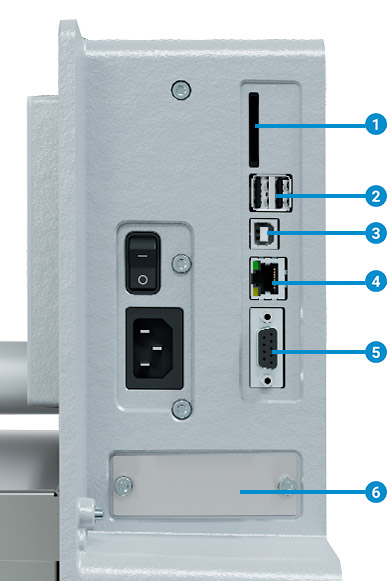
1 Power plug
2 Cold device socket 100-240 VAC / 18-60 VDC upon request
3 Slot to connect a SD memory card
4 2 USB hosts to connect a Service Key, an USB stick, a keyboard, barcode scanner, an USB WLAN stick, external operation panel
5 USB 2.0 Hi-speed device to connect a PC
6 Ethernet 10/100 Mbit/s
7 RS232C 1,200 to 230,400 baud/8 bit
8 I/O interface slot
- Digital I/O interface 24 VDC
- Digital I/O interface 5 VDC
- 2 port Ethernet Switch 10/100 Mbit/s
- External label sensor
Want to learn more?
Ask for an offer free of charge and without obligation:
Learn more:
 typical
  standard
  option
| Print module Type | PX QS 4.3 | PX QS 4 | PX QS 6.3 | |||
|---|---|---|---|---|---|---|
| Print method Thermal transfer | |
|
|
|
|
|
| Print method Direct thermal | |
|
- | - | |
|
| Print resolutiondpi | 203 | 300 | 300 | 600 | 203 | 300 |
| Print speed mm/s max. | 300 | 300 | 300 | 150 | 250 | 250 |
| Print width mm max. | 104 | 108.4 | 105.7 | 105.7 | 168 | 162.6 |
| Direction to which labels are provided | L = to the left, R = to the right | |||||
| Print distance to locating edge mm valid for L and R | 3.2/2.6 | 1/0.4 | 2/2 | 2/2 | 1.2/1.2 | 3.9/3.9 |
| Material | ||||||
| Labels3) | paper, synthetics such as PET, PE, PP, PI, PVC, PU, acrylate, Tyvec | |||||
| booklets | - | |||||
| Label1) Width mm | 10 - 116 | 10 - 116 | 50 - 174 | |||
| Label1) Height mm | 6 - 300 | 6 - 300 | 12 - 300 | |||
| Label1) Thickness mm max. | 0.60 | 0.60 | 0.60 | |||
| Liner Widthmm | 16 - 120 | 16 - 120 | 50 - 178 | |||
| Liner Thickness mm | 0.03 - 0.10 | |||||
| Ribbon2) Color layer | outside or inside | |||||
| Ribbon2) Roll diametermm max. | 80 | |||||
| Ribbon2) Core diametermm | 25.4 | |||||
| Ribbon2) Length m max. | 600 | |||||
| Ribbon2) Width mm | 25 - 114 | 25 - 114 | 50 - 170 | |||
| Ribbon2) Automatic saving |  |
|
|
|||
| Print module dimensions, weights | ||||||
| Width x Height x Depth mm | 245 x 300 x 333 | 245 x 300 x 393 | ||||
| Weight kg | 11.5 | 12 | ||||
| Label sensors, position indicators | ||||||
| Transmissive sensor detecting | label margins, punch marks or print marks, materials ending | |||||
| Reflective sensor from below detecting | print marks on non-translucent liner materials | |||||
| Sensor distance to locating edge mm | 4 - 60 | 4 - 60 | 4 - 60 | |||
| Material passagemm | 2 | |||||
| Electronics | ||||||
| 32 bit processorMHz | 800 | |||||
| RAMMB | 256 | |||||
| IFFS memoryMB | 50 | |||||
| Slot to insert a memory card (SDHC, SDXC) | |
|||||
| Battery to display time and date; real time clock |  |
|||||
| Data (e.g. serial numbering) preserved if power turns off | |
|||||
| Interfaces | ||||||
| RS232C 1,200 to 230,400 baud / 8 bit | |
|||||
| USB 2.0 Hi-Speed to connect a PC | |
|||||
| Ethernet 10/100 Mbit/s | IPv4 / IPv6 static IP / DHCP · IEEE 802.1X |
|||||
| 2 USB hosts on the operation panel, 2 USB hosts on the back of a unit |
Service Key, USB stick, USB WLAN stick, USB WLAN stick with a rod antenna, keyboard, barcode scanner, external operation panel | |||||
| Digital I/O interface 24 VDC, 8 inputs / 9 outputs | |
|||||
| Digital I/O interface 5 VDC, 5 inputs / 6 outputs | |
|||||
| 2 port Ethernet switch 10/100 Mbit/s | |
|||||
| Operating data | ||||||
| Voltage | 100-240 VAC, 50/60 Hz, PFC | |||||
| Power consumption | <10 W in standby / 100 W in typical operation / max. 200 W | |||||
| Temperature / humidity Operation | + 5 - 40°C / 10 - 85% not condensing | |||||
| Temperature / humidity Stock | 0 - 60°C / 20 - 85% not condensing | |||||
| Temperature / humidity Transport | – 25 - 60°C / 20 - 85% not condensing | |||||
| Approvals | CE, UKCA, FCC Class A, ICES-3, cULus, CB, RCM | |||||
- Limitations can occur when processing small labels, thin materials or materials using a strong adhesive. Critical applications need testing.
- A ribbon should be at least as wide as the liner material.
- Deflection rollers with a diameter of 60 mm prevent stiff labels or booklets from detaching off a liner.
For more technical data please read the product brochure (PDF)
Want to learn more?
Ask for an offer free of charge and without obligation:
Learn more:
-
Accessories
-
SD memory card
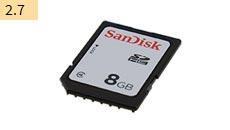
-
USB memory stick
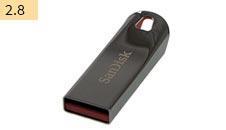
-
USB WLAN stick
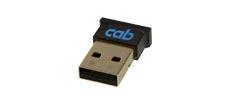
2.4 GHz 802.11b/g/n
hotspot or infrastructure mode -
USB WLAN stick with a rod antenna
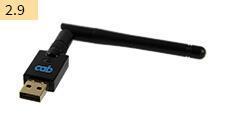
to extend the range of operation
2.4 GHz 802.11b/g/n + 5 GHz 802.11a/n/ac
hotspot or infrastructure mode -
I/O interface plug SUB-D, 25 pins
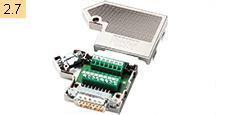
All control signals can be attached to the I/O interface using clamping screws.
-
I/O interface plug SUB-D, 15 pins
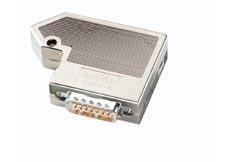
Cable connection via clamping screws
-
External operation panel
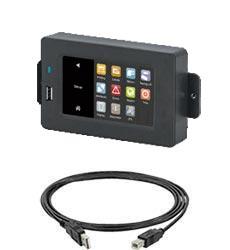
If the operation panel of a printer cannot be accessed, an additional external one can be plugged.
Same functionality as on the printer
Landscape or portrait mode
Operability as desired on the external operation panel or on the printer
Printer connectivity: USB 2.0 Hi-Speed device
1 LED signal: Power ON
2 USB slot to connect the Service Key or a memory stick, in order to transfer data to the IFFS memory
3 Connecting USB cable
for power supply
cab provides specified cables. Lengths are 1.8 m to 16 m -
Label selection – I/O box
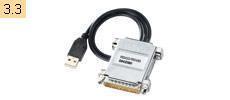
A maximum of 16 different labels can be selected from a memory card by a master control unit, such as a PLC.
-
Detecting transparent labels
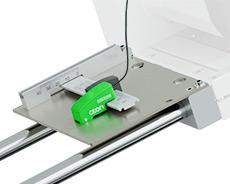
For this purpose, a SP demand module and the CEON label sensor are assembled between the labeling head and the print module. They are connected via the I/O interface using the circular connector for external label sensors.
SP demand modules
They are attached to the two mounting rods.Direction to which labels are provided Dimensions A mm Types left Types right Demand module SP 100/124L SP 100/124R 124 SP 100/186L SP 100/186R 186 CEON sensor for transparent labels
Teaching is performed on the sensor. The sensor can be aligned along the retainer bar. Distances can be easily set using a scale.Retainer bar
It is assembled onto the dispenser tongue.Stop
It is adjustable for accurate spotting after sensor disassembly. -
PX QS carrier
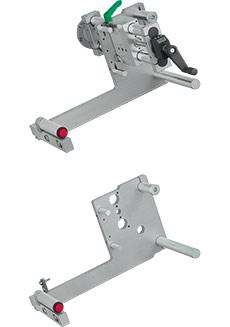
1 PX QS carrier
Top image: PX QS carrier and column standfor print module attachment to ROXI, IXOR+ and IXOR It is designed for providing labels both to the left and right. The print module is slid onto the guides A on the carrier and fixed by screws.
The labeling head is attached to the unit retainer B.
Adjustment transverse the direction of transport is performed using a column stand 2 .
When processing narrow labels, the print module can be shifted 7 mm transverse the direction of transport to prevent the ribbon from wrinkling. As a result, the ribbon rests on both sides on the print roller. The material gap is reduced accordingly.
Mounting rods are required at least 450 mm long.
Types L Types R Material width
mm max.Carriers PX QS 124 L PX QS 124 R 124 PX QS 186 L PX QS 186 R 186 -
Column stand, adjusting disc and angular gear
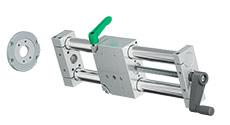
2 Column stands
In compact design with trapezoidal threads and pitch 4 mm. Assembly of a labeling head onto a base plate or a column stand along a conveyor.Types Column length mm Adjustable track mm Column stands
SST 400 K 400 250 SST 600 K 600 450 SST 800 K 800 650
3 Adjusting disc
The outer disc is attached on a base plate to the carriage of the column stand. Another column stand is assembled perpendicular and in rotatable manner on the inner disc. Adjustable angles are 0° to 45°.4 Angular gear
It can be installed for easier adjustment of the labeling head. Assembly in steps of 90°, with or without a position indicator; an EPOS / SST position indicator can be attached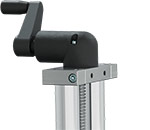
Stand with angular gear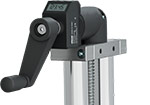
Stand with angular gear and position indicator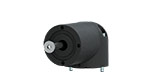
Angular gear -
EPOS / SST position indicator
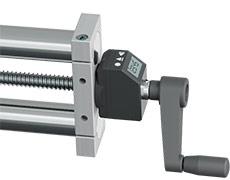
Indication of a label spot on a product by the electronic position indicator. Optimum alignment to reading position regardless of the orientation of installation of a a labeling head. Scope of delivery includes adapter kit.
Display settings:
counting up or down
reset display value
offset value
mm or inch
absolute or incremental
-
Want to learn more?
Ask for an offer free of charge and without obligation:
Learn more:
Digital I/O interface 24 VDC
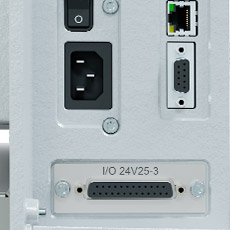
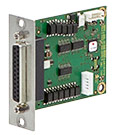
25 pin SUB-D socket connector
compliant with IEC/EN 61131-2, type 1+3;
All inputs and outputs are galvanically isolated and protect from reverse polarity. In addition, outputs are short circuit protected.
Start printing
Reprint
Delete print job
Label removed
Stop printing
Label feed
Pause
Reset
Device ready
Print data available
Label ready for removal
Paper feed ON
Prior warning to a ribbon ending
End of ribbon and / or label web
Collective error
Printing started
Digital I/O interface 5 VDC
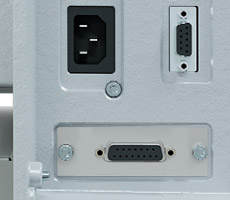
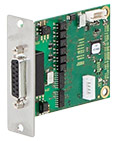
15 pin SUB-D socket connector
Label feed
Reprint
Start printing
Pause
Delete print job
Prior warning to a ribbon ending
End of ribbon error
End of label web error
Print data available
Printing finished
Printer error
2 port Ethernet Switch 10/100 Mbit/s
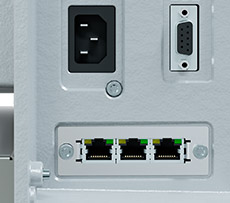
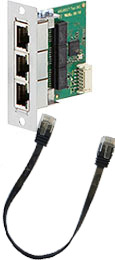
to connect a printer and labeler in a joint network.
Signals are looped through.
Scope of delivery includes a RJ45 Ethernet cable, 0.2 m
Data exchange between the labeling head, the print module and the control system is preferably carried out via OPC UA For this purpose, an Ethernet switch can be installed in the print module If the slot is occupied by a digital I/O or sensor interface, the ethernet switch must be installed externally.
Interface for plugging an external label sensor
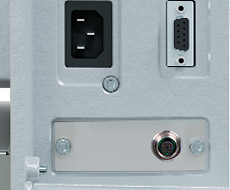
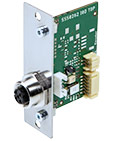
M12 plug, 5 pins, a-coded
Plug-compatible with CEON and other sensors based on PNP and 24 V
Scope of delivery includes connecting cable
UR D60 deflection roller
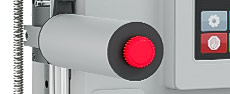
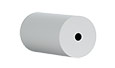
Deflection rollers with a diameter of 60 mm help with materials that detach off a liner when bent at a tight radius.
Want to learn more?
Ask for an offer free of charge and without obligation:
Learn more:
Documentation
-
Catalogs
-
Title Format Version Last change Language Labeling heads with PX QS
ROXI / IXOR+ labeling heads with PX QS print modulesPDF - 3.46 MB 10/2026 02/10/2026 English
-
-
Assembly Instructions
-
Title Format Version Last change Language Assembly Instructions PX QS
PDF - 3.12 MB 08/2026 06/08/2026 English
-
-
Interface Descriptions
-
Information on the interface type can be found on the original cab packaging, in the printer status report after installation or as a label next to the SUB-D connection.
Title Format Version Last change Language Interface Description I/O 24V25-2 and I/O 24V25-3
PDF - 281 KB 05/2025 11/06/2026 English Interface Description I/O 24V25-4
PDF - 281 KB 05/2025 11/06/2026 English Interface Description I/O 5V15-2 and I/O 5V15-3
PDF - 202 KB 05/2020 06/02/2024 English -
Other languages
-
Title Format Version Last change Language Description de l'interface I/O 24V25-4
PDF - 304 KB 05/2025 11/06/2026 Français Description des interfaces I/O 24V25-2 et I/O 24V25-3
PDF - 302 KB 05/2025 11/06/2026 Français Description des interfaces I/O 5V15-2 et I/O 5V15-3
PDF - 583 KB 05/2020 01/03/2023 Français Schnittstellenbeschreibung I/O 24V25-2 und I/O 24V25-3
PDF - 265 KB 05/2025 16/05/2025 Deutsch Schnittstellenbeschreibung I/O 24V25-4
PDF - 268 KB 05/2025 16/05/2025 Deutsch Schnittstellenbeschreibung I/O 5V15-2 und I/O 5V15-3
PDF - 197 KB 05/2020 01/03/2023 Deutsch
-
-
-
Configuration Manuals
-
Title Format Version Last change Language Configuration manual cab Label Printers
from SN 14089PDF - 2.56 MB 07/2026 28/07/2026 English -
Other languages
-
Title Format Version Last change Language Konfigurationsanleitung cab-Etikettendrucker
ab SN 14089PDF - 2.59 MB 07/2026 28/07/2026 Deutsch Manuel de configuration imprimantes d'étiquettes cab
à partir du numéro de série 0014089PDF - 2.67 MB 08/2026 06/08/2026 Français
-
-
-
Programming
-
Title Format Version Last change Language Brief introduction to cab printer programming
PDF - 7.47 MB 04/2022 15/01/2025 English cab Download Converter (download.exe)
Converts image, font and database files into the JScript download data format.
Install MS Visual C++ 2010 Redistributable if not available on your system.ZIP - 9 KB 2.3 25/10/2024 – cab Remote Control
Remote control of cab systems for label printing / Fernsteuerung von cab Drucksystemen - HERMES Q, SQUIX, PX QZIP - 3.50 MB 2021/07 15/01/2025 English/Deutsch cabPROTECT - Data security in label printing
PDF - 472 KB 06/2024 20/06/2024 English Connecting cab printing systems to SAP®
CompendiumPDF - 4.45 MB 01/2025 11/02/2025 English Networked labeling with OPC UA
cab and the Smart FactoryPDF - 1.12 MB – 25/03/2026 English OPC UA Reference
PDF - 1.04 MB 07/2026 30/07/2026 English OPC-UA Quick Guide: Connecting cab printing systems via UaExpert
PDF - 1.16 MB 03/2026 23/03/2026 English PLC Programmer's Guide HERMES Q, SQUIX, XD Q, PX Q
with label layouts and programming examplesZIP - 16.17 MB 06/2020 22/12/2025 English Programming Manual abc Basic Compiler
for cab printersPDF - 1.49 MB 09/2026 18/09/2026 English Programming Manual JScript
for SQUIX, MACH 4S, EOS2, EOS5, XC Q, XD Q, HERMES Q, PX Q, AXON1, AXON 2, A+, HERMES+, A-Series, EOS1/4, MACH4, XD, XCPDF - 4.31 MB 07/2026 20/07/2026 English Web Services: Support for cab printing systems using SOAP
– 09/2026 24/09/2026 English ZPL Emulation with cab printers
PDF - 1.96 MB 09/2026 18/09/2026 English -
Other languages
-
Title Format Version Last change Language Anbindung von cab Drucksystemen an SAP®
KompendiumPDF - 4.55 MB 01/2025 11/02/2025 Deutsch Kurze Einführung in die cab Druckerprogrammierung
PDF - 7.50 MB 04/2022 12/04/2022 Deutsch Marquage en réseau avec OPC UA
cab et l'usine intelligentePDF - 745 KB 01/2022 23/10/2024 Français Nodeset-XMLs
Original NodeSet2.xml files for importing into your own OPC UA clients.ZIP - 49 KB 07/2026 30/07/2026 – SPS Programmieranleitung HERMES Q, SQUIX, XD Q, PX Q
mit Etikettenlayouts und BeispielprogrammenZIP - 16.22 MB 06/2020 18/04/2024 Deutsch Vernetzt kennzeichnen mit OPC UA
cab und die intelligente FabrikPDF - 1.13 MB 03/2019 28/01/2021 Deutsch
-
-
-
Assembly Instructions Spare Parts
-
Title Format Version Last change Language 9004105 | Druckkopfwechsel / Printhead Replacement: SQUIX, HERMES Q, MACH 4S, EOS2, EOS5, PX Q, AXON1, XC Q, XD Q
PDF - 5.70 MB 06/2024 18/06/2024 English/Deutsch
-
-
Manuals Accessories
-
Title Format Version Last change Language External Operation Panel - Instructions
PDF - 274 KB 04/2023 12/04/2023 English Label File Selection Box - Input Output Box - Instructions
PDF - 329 KB 04/2023 12/04/2023 English -
Other languages
-
Title Format Version Last change Language Etikettenauswahlbox - Ein-/Ausgabebox - Betriebsanleitung
PDF - 317 KB 04/2023 12/04/2023 Deutsch Externes Bedienfeld - Betriebsanleitung
PDF - 280 KB 04/2023 12/04/2023 Deutsch Labelbox - I/O Box - Instructions d'utilisation
PDF - 330 KB 04/2023 12/04/2023 Français Panneau de commande externe - Instructions d'utilisation
PDF - 277 KB 04/2023 12/04/2023 Français
-
-
-
EU Declarations of Conformity - Accessories
-
Title Format Version Last change Language External Operation Panel - EU Declaration of Conformity
PDF - 30 KB 07/2019 02/02/2023 English -
Other languages
-
Title Format Version Last change Language Etikettenauswahlbox - Ein-/Ausgabebox - Konformitätserklärung
PDF - 30 KB 07/2019 02/12/2020 Deutsch Externes Bedienfeld - Konformitätserklärung
PDF - 30 KB 07/2019 02/12/2020 Deutsch Labelbox - I/O Box - Déclaration UE de conformité
PDF - 30 KB 07/2019 02/12/2020 Français Panneau de commande externe - Déclaration UE de conformité
PDF - 30 KB 07/2019 02/12/2020 Français
-
-
-
Safety data sheets
-
Title Format Version Last change Language Safety Data Sheet Special Cleaner for Glass and Plastic GR1N
PDF - 65 KB 08/2017 23/10/2024 English -
Other languages
-
Title Format Version Last change Language Sicherheitsdatenblatt Spezial Glasreiniger und Kunststoffreiniger GR1N
PDF - 156 KB 06/2017 25/08/2022 Deutsch Sicherheitsdatenblatt Spezial-Gummiwalzen-Reiniger WR1
PDF - 173 KB 06/2017 25/08/2022 Deutsch
-
-
3D CAD models
The files are provided in STEP format, which requires CAD software. Follow this link to download a free STP Viewer: VariCAD Viewer (External website).
Select the desired model and click on the link. A short registration follows. cab will handle your personal information as described in our Privacy statement. This information will not be accessible to any third party for marketing purposes. You will receive an email with an activation link and you can download the models.
You need Adobe Reader to view the PDF-files. Download current version of Adobe Reader
Want to learn more?
Ask for an offer free of charge and without obligation:
Learn more:
Software & Drivers
-
Firmware
-
Title Format Version Last change Language cabFirmwareUpdater
Windows 32 & 64 bit (starting from Vista)ZIP - 21.75 MB 3.12.0.0 26/03/2025 – Firmware X4
Firmware SQUIX | EOS2 | EOS5 | MACH 4S | XD Q | XC Q | HERMES Q | PX Q | AXON 1ZIP - 56.42 MB 5.48.2 21/09/2026 – Release Notes Firmware X4
 TXT - 150 KB
5.00 - 5.48.2 21/09/2026 –
-
-
Firmware periphery
-
Title Format Version Last change Language cabFirmwareUpdater
Windows 32 & 64 bit (starting from Vista)ZIP - 21.75 MB 3.12.0.0 26/03/2025 – Firmware I/O 24V25-2, I/O 24V25-3, I/O 5V15-2 and I/O 5V15-3
ZIP - 23 KB 3.2.0 08/04/2025 –
-
-
Drivers
-
Title Format Version Last change Language cab Linux Armv7 - 32 Bit Driver
CUPS Linux Armv7 32bit Driver RPi 2/3/4 (min. CUPS 1.2)GZ - 2.80 MB 1.46 23/10/2024 – cab Linux Armv8(aarch64) - 64 Bit Driver
CUPS Linux Armv8 64 Bit Driver RPi 3/4 (min. CUPS 1.2)GZ - 2.80 MB 1.46 23/10/2024 – cab Linux x86 - 32 Bit Driver
CUPS Linux Intel 32bit Driver (min. CUPS 1.2)GZ - 2.81 MB 1.46 23/10/2024 – cab Linux x86 - 64 Bit Driver
CUPS Linux Intel/AMD 64bit Driver (min. CUPS 1.2)GZ - 2.80 MB 1.46 23/10/2024 – cab MAC OS Driver
Apple® Mac OS 10.15 - 26ZIP - 2.97 MB 1.46 27/02/2026 – cab MAC OS X Driver
Apple® Mac OS X 10.6 - 10.14ZIP - 5.82 MB 1.46 23/10/2024 – cab Windows Driver ARCHIV
Vista, Windows 7, Windows 8, Windows 8.1, Windows 10, Windows Server 2008, 2008 R2, 2012, 2012 R2, 2016, 2019 - 32/64 Bit CERTIFIED, works on Windows 11 (Not certified!)ZIP - 9.37 MB 5.3.03 24/10/2025 – cab Windows Driver NEW
Windows 10, Windows 11, Windows Server 2016, Windows Server 2019, Windows Server 2022, Windows Server 2025 - 64Bit, requires latest Visual C++ RedistributableZIP - 22.64 MB 1.4.2.0 01/04/2026 – cab Windows Driver NEW ARM64
ZIP - 19.27 MB Windows 11, requires latest Visual C++ Redistributable 01/04/2026 – cab Windows Driver NEW Release Notes
PDF - 292 KB 1.2.1.20 - 1.4.2.0 01/04/2026 –
-
-
Software
-
Title Format Version Last change Language cab Download Converter (download.exe)
Converts image, font and database files into the JScript download data format.
Install MS Visual C++ 2010 Redistributable if not available on your system.ZIP - 9 KB 2.3 25/10/2024 – cablabel S3 Demo (Free)
Windows Vista, 7, 8, 10, 11, Server 2008, 2008 R2, 2012, 2012 R2, 2016, 2019, 2022ZIP - 51.42 MB 1.4.0.10 11/07/2025 – cablabel S3 Lite (Free)
Windows Vista, 7, 8, 10, 11, Server 2008, 2008 R2, 2012, 2012 R2, 2016, 2019, 2022ZIP - 69.78 MB 1.4.0.10 11/07/2025 – cablabel S3 Print
Windows Vista, 7, 8, 10, 11, Server 2008, 2008 R2, 2012, 2012 R2, 2016, 2019, 2022ZIP - 75.95 MB 1.4.0.10 11/07/2025 – cablabel S3 Pro
Windows Vista, 7, 8, 10, 11, Server 2008, 2008 R2, 2012, 2012 R2, 2016, 2019, 2022ZIP - 86.77 MB 1.4.0.10 11/07/2025 – Database Connector
Windows 32 & 64 bitZIP - 27.77 MB 4.4.0.0 21/01/2026 – LogService
for Database ConnectorZIP - 4.15 MB 1.7.1.0 25/10/2024 –
-
You need Adobe Reader to view the PDF-files. Download current version of Adobe Reader
Want to learn more?
Ask for an offer free of charge and without obligation:
Learn more:

Software, Drivers, programming, , Connecting to SAP® and network integration.