Contents
1 Introduction
A web service is a standardized way for two programs to talk to each other over a network — independent of the platform, programming language, or location on either side.
Instead of a person operating a user interface, one application sends a request and another returns a response, both in a well-defined, machine-readable format.
This service uses SOAP (Simple Object Access Protocol). SOAP exchanges messages as XML documents and transports them over ordinary HTTP(S), so it works through standard network infrastructure. The available operations, their parameters, and their return values are described in a WSDL file (Web Services Description Language) — a machine-readable contract that development tools read to generate ready-to-use client code automatically.
For the user this means:
- Independent of operating system, programming language, and location
- Built on open, established standards, supported by all major platforms (e.g. Microsoft, SAP, Oracle)
- No printer driver or dedicated software required — labels can be printed straight from an ERP system
- Unicode support for multilingual content
The following chapters describe the cab printer's SOAP web service in detail: chapter 2 covers connecting and activation, chapters 4–6 document the operations, data types and errors, and chapter 7 shows how to call the service from C#, Visual Basic, and Python.
2 Connecting to the printer's web service
Applicability
The SOAP web service is available on all cab label printers based on the X4 main board.
Activating the web service
The web service is switched off by default and must be activated on the printer before it can be used. Activate it directly on the device, in the printer's menu:
Setup › Interfaces › Network services › Web service
Set Web service to On.
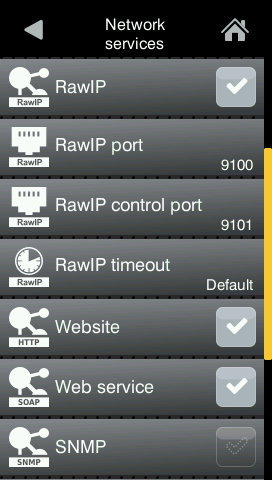
Printer GUI · Setup › Interfaces › Network services (Web service = On)
The WSDL and the service endpoint
Once activated, the printer serves its WSDL contract at:
WSDL URL
http://<printer IP or DNS name>/cgi-bin/soap/services.wsdl
The SOAP requests themselves are sent to the service endpoint:
Service endpoint
http://<printer IP or DNS name>/cgi-bin/soap/printerservice
The printer inserts the correct scheme ( http or https ) and host into the WSDL automatically, so the address a development tool discovers always matches how the printer was reached.
Ports, HTTP and HTTPS
The service is reached over the printer's web server on port 80 (HTTP) or, when TLS is enabled, port 443 (HTTPS). Whenever authentication is used, prefer HTTPS — see chapter 3.
3 Authentication
Access to the web service can be protected with one of three modes: None, Basic, or Digest. The mode is selected on the printer, in the menu:
Security › Security web service
Choose None, Basic, or Digest. The default setting is Digest.
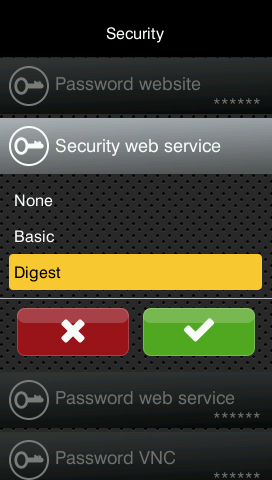
Printer GUI · Security › Security web service (None / Basic / Digest — default Digest)
Default credentials
For Basic and Digest the service uses the dedicated user account:
- User name:
soap
- Password:
soap
Change the default password
Change the default soap password before putting the printer into productive or network-exposed use.
Use TLS for credentials
Basic / Digest only over HTTPS
With Basic authentication the credentials are transmitted effectively in clear text. Whenever Basic or Digest is enabled, enable HTTPS on the printer and address the service via https:// so credentials are not exposed on the network.
4 Operations reference
The service exposes seven operations under the namespace http://www.cab.de/WSSchema (SOAP 1.1, document/literal). ESC status keywords are documented in the cab programming manual.
| Operation |
Input |
Returns |
Purpose |
getPrinterStatus |
status keyword (string) |
status string |
Query printer / label status |
getlistOfFormats |
— |
list of format |
Labels stored on the card |
getlistOfObjects |
— |
list of fObject |
Objects of the loaded label |
getlistOfJobs |
— |
list of job |
Ten most recent jobs |
loadFormat |
label name (string) |
generic + result |
Load a label from the card |
printFormat |
objects, jobID, count |
generic + result |
Fill fields and print |
abortAllJobs |
— |
— |
Cancel all jobs / reset |
4.1 getPrinterStatus
Returns a status value as a string. Accepted input keywords: Generic, Label, and the ESC selectors ESCs, ESCz, ESCi, ESCl, ESCa, ESCj, ESC?.
- Generic returns one of:
ready, printing, pause, error, menu, dump mode.
- Label returns the name of the last loaded label; empty if none has been loaded.
Exemplary XML
Request
    <statusRequest>Generic</statusRequest>
Response
    <statusResponse>ready</statusResponse>
4.2 getlistOfFormats
Lists the label formats stored on the printer's memory card (files with extension .lbl or .prn). Each entry has a name and a description. Empty if no formats are available.
Exemplary XML
Request
    <listOfFormatsRequest/>
Response
    <listOfFormatsResponse>
        <format>
            <name>TEXT.LBL</name>
            <description>TEXT</description>
        </format>
        <format>
            <name>OBJ.LBL</name>
            <description>Test for objectinfo</description>
        </format>
    </listOfFormatsResponse>
4.3 getlistOfObjects
Lists the objects (fields) of the currently loaded label. Each fObject has a name and a type (Text, Barcode, Image, Graphic, or Richtext). Empty if no label is loaded.
Exemplary XML
Request
    <listOfObjectsRequest/>
Response
    <listOfObjectsResponse>
        <fObject>
            <name>text1</name>
            <type>Text</type>
        </fObject>
        <fObject>
            <name>ean</name>
            <type>Barcode</type>
        </fObject>
    </listOfObjectsResponse>
4.4 getlistOfJobs
Returns the ten most recent jobs. Each job has an id, a date, a time, and a status. The status is one of:
- finished — job completed;
- aborted — job cancelled;
- printed #N — number of labels printed so far (job not yet complete).
Exemplary XML
Request
    <listOfJobsRequest/>
Response
    <listOfJobsResponse>
        <job>
            <id>a17</id>
            <date>2025-12-09</date>
            <time>12:05:51</time>
            <status>aborted</status>
        </job>
        <job>
            <id>a17</id>
            <date>2025-12-09</date>
            <time>12:05:50</time>
            <status>printed #3</status>
        </job>
    </listOfJobsResponse>
4.5 loadFormat
Loads a label format from the memory card. Input is the format's file name. The response carries a human-readable generic message and a boolean result: true if the format was loaded, false if it could not be found.
Exemplary XML
Request
    <loadFormatRequest>OB1.LBL</loadFormatRequest>
Response
    <loadFormatResponse>
        <generic>Selected Format not found</generic>
        <result>false</result>
    </loadFormatResponse>
On success, generic is Format successfully loaded and result is true.
Note. If a label describes a print action without a job size, you may need to add A 1[NO]; otherwise the load request cannot be sent twice without a print request in between.
4.6 printFormat
Sends a print request. A format must be loaded first (see loadFormat). Input values:
- objects — the fields to change, each as name and value;
- jobID — an optional job name, used to identify the job in getlistOfJobs;
- numbers — the number of labels to print (1 … 999999).
The response carries a generic message and a boolean result: true if the job entered the print queue, false if the objects do not match the loaded label.
Exemplary XML
Request
    <printFormatRequest>
        <objects>
            <fObject>
                <name>barcode_nummer_1</name>
                <value>1234578</value>
            </fObject>
        </objects>
        <jobID>a17</jobID>
        <numbers>100</numbers>
    </printFormatRequest>
Response
    <printFormatResponse>
        <generic>Format will be printed</generic>
        <result>true</result>
    </printFormatResponse>
4.7 abortAllJobs
Cancels all print jobs and resets the print processing on the printer. Takes no input and returns an empty response.
Interrupts all printing
abortAllJobs aborts every running and queued job on the device immediately. Any partially printed job is lost. Use it only deliberately — e.g. to recover a stuck queue — never as part of a normal print flow.
Exemplary XML
Request
    <abortAllJobsRequest/>
Response
    <abortAllJobsResponse/>
5 Data types
All types belong to the namespace http://www.cab.de/WSSchema.
| Type |
Fields |
Used by |
format |
name (string), description (string) |
getlistOfFormats |
objectType |
name (string), type (string) |
getlistOfObjects (as fObject) |
job |
id (string), date (date), time (time), status (string) |
getlistOfJobs |
objectTypePrint |
name (string), value (string) |
printFormat (as fObject) |
loadFormat |
generic (string), result (boolean) |
loadFormat & printFormat responses |
faultType |
faultCode (string), faultString (string) |
SOAP faults (all operations) |
Note. objectType (fields name/type, for listing) and objectTypePrint (fields name/value, for printing) are different types — both appear on the wire as <fObject>.
6 Error handling
The service reports problems in two distinct ways:
SOAP faults
Infrastructure-level failures (internal errors while talking to the print engine) are returned as a SOAP fault of type faultType, carrying a faultCode and a faultString (typically Internal server error). Every operation may return a fault. In client code, catch these as an exception.
Exemplary XML — SOAP fault
<faultResponse>
    <faultCode>Server</faultCode>
    <faultString>Internal server error</faultString>
</faultResponse>
In-band results
Expected, “soft” conditions are not faults. loadFormat and printFormat return normally with result = false and an explanatory generic message — for example when a format is not found, the field names do not match the loaded label, or the label count is out of range.
7 Using the web service from a programming language
A SOAP client is generated from the WSDL. For C# and Visual Basic, the section starts with setting up the Visual Studio project and adding the service reference; Python needs no project setup. Each language then shows a minimal “get status” example for the three authentication modes, followed by one shared application example (load a label and print it).
Setting up the project (C# / Visual Basic)
The Visual Studio steps are the same for both languages; only the selected project language differs.
Creating the project
In Visual Studio, create a new project of type Empty Project (.NET Framework) and select the language — C# or Visual Basic. Give it a name (e.g. cabWebService), choose a location, and set the framework to .NET Framework 4.8.1 (newer versions work as well). Click Create.
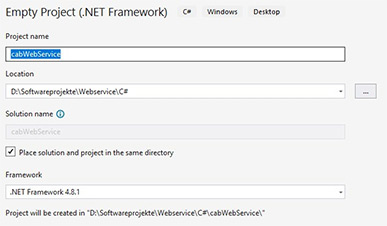
C# · Setup 1 - Create Project
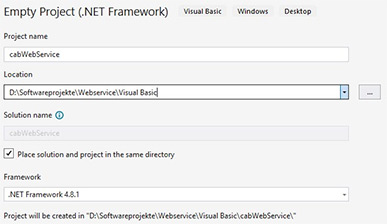
Visual Basic · Setup 1 - Create Project
Adding the service reference
With the web service activated on the printer (chapter 2), right-click the project and choose Add › Service Reference. Enter the WSDL address of your printer, e.g. http://192.168.200.60/cgi-bin/soap/services.wsdl, and choose a namespace (arbitrary, e.g. cab). When prompted, enter the SOAP connection credentials — the defaults are soap / soap. Visual Studio then generates the client proxy and an App.config.
Note. A service reference can be added only in projects based on .NET 5+, .NET Core, or ASP.NET Core; see the WCF Web Service Reference Guide.
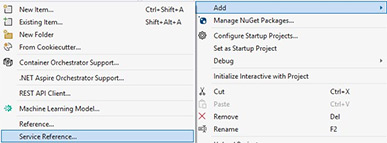
C# · Setup 2 - Add Service Reference
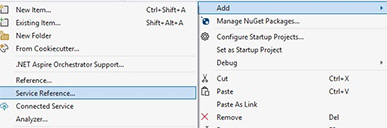
Visual Basic · Setup 2 - Add Service Reference
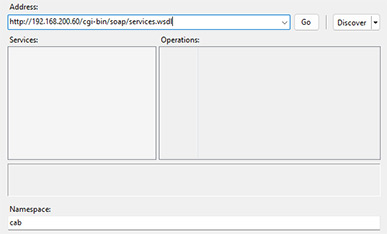
C# · Setup 3 - Service Reference Address
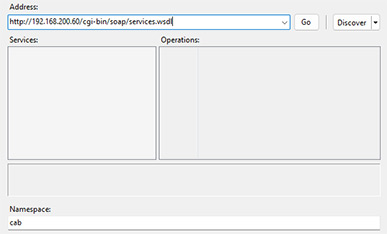
Visual Basic · Setup 3 - Service Reference Address
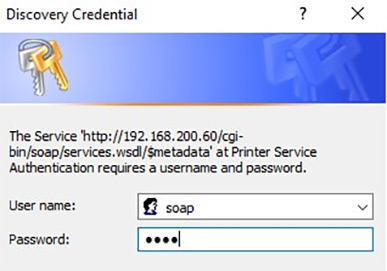
C# · Setup 4 - Discovery Credential
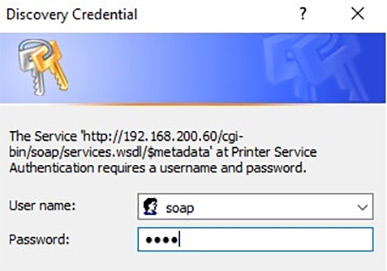
Visual Basic · Setup 4 - Discovery Credential
Configuring App.config
Visual Studio generates an App.config with one binding and one endpoint. Add a binding and endpoint per authentication mode:
App.config — bindings
<basicHttpBinding>
    <!-- Binding without authentication -->
    <binding name="cabSOAPBinding" />

    <!-- Binding with basic authentication -->
    <binding name="cabSOAPBindingBasic">
        <security mode="TransportCredentialOnly">
            <transport clientCredentialType="Basic" />
        </security>
    </binding>

    <!-- Binding with digest authentication -->
    <binding name="cabSOAPBindingDigest">
        <security mode="TransportCredentialOnly">
            <transport clientCredentialType="Digest" />
        </security>
    </binding>
</basicHttpBinding>
App.config — endpoints
<client>
    <!-- Standard endpoint without authentication -->
    <endpoint address="http://192.168.200.60/cgi-bin/soap/printerservice"
        binding="basicHttpBinding" bindingConfiguration="cabSOAPBinding"
        contract="cab.cabPrinterSOAP" name="PrinterWebServiceSOAP" />

    <!-- Endpoint with basic authentication -->
    <endpoint address="http://192.168.200.60/cgi-bin/soap/printerservice"
        binding="basicHttpBinding" bindingConfiguration="cabSOAPBindingBasic"
        contract="cab.cabPrinterSOAP" name="PrinterWebServiceSOAPBasic" />

    <!-- Endpoint with digest authentication -->
    <endpoint address="http://192.168.200.60/cgi-bin/soap/printerservice"
        binding="basicHttpBinding" bindingConfiguration="cabSOAPBindingDigest"
        contract="cab.cabPrinterSOAP" name="PrinterWebServiceSOAPDigest" />
</client>
7.1 C#
The CabService class below sends a status request over each of the three authentication modes.
C# — DemoApplication.cs (status examples)
using cabWebService.cab;
using System;
using System.ServiceModel.Security;

namespace cabWebService
{
    public class CabService
    {
        private void GetStatus_None()
        {
            cab.cabPrinterSOAPClient soapClient = new cabWebService.cab.cabPrinterSOAPClient("PrinterWebServiceSOAP");

            try
            {
                string status = soapClient.getPrinterStatus("Generic");
                Console.WriteLine("Printer Status: " + status);
            }
            catch (Exception except)
            {
                Console.WriteLine("Error: " + except.Message);
            }
        }

        private void GetStatus_Basic(string username, string password)
        {
            cab.cabPrinterSOAPClient soapClient = new cabWebService.cab.cabPrinterSOAPClient("PrinterWebServiceSOAPBasic");
            soapClient.ClientCredentials.UserName.UserName = username;
            soapClient.ClientCredentials.UserName.Password = password;

            try
            {
                string status = soapClient.getPrinterStatus("Generic");
                Console.WriteLine("Printer Status using basic authentication: " + status);
            }
            catch (Exception except)
            {
                Console.WriteLine("Error: " + except.Message);
            }
        }

        private void GetStatus_Digest(string username, string password)
        {
            cab.cabPrinterSOAPClient soapClient = new cabWebService.cab.cabPrinterSOAPClient("PrinterWebServiceSOAPDigest");
            HttpDigestClientCredential digestCred = soapClient.ClientCredentials.HttpDigest;
            digestCred.ClientCredential.UserName = username;
            digestCred.ClientCredential.Password = password;
            digestCred.AllowedImpersonationLevel = System.Security.Principal.TokenImpersonationLevel.Impersonation;

            try
            {
                string status = soapClient.getPrinterStatus("Generic");
                //ICommunicationObject channel = (ICommunicationObject)soapClient.ChannelFactory.CreateChannel(soapClient.Endpoint.Address);
                //channel.Open();
                Console.WriteLine("Printer Status using digest algorithm: " + status);
            }
            catch (Exception except)
            {
                Console.WriteLine("Error: " + except.Message);
            }
        }

        // GetSOAPClientDigest, ShowLabelObjects, PrintLabel and Main follow — see 7.4
    }
}
7.2 Visual Basic
Visual Basic — DemoApplication.vb (status examples)
Imports cabWebService.cab
Imports System
Imports System.ServiceModel.Security

Namespace cabWebService
    Public Class CabService
        Private Sub GetStatus_None()
            Dim soapClient As cab.cabPrinterSOAPClient = New cab.cabPrinterSOAPClient("PrinterWebServiceSOAP")

            Try
                Dim status As String = soapClient.getPrinterStatus("Generic")
                Console.WriteLine("Printer Status: " & status)
            Catch except As Exception
                Console.WriteLine("Error: " & except.Message)
            End Try
        End Sub

        Private Sub GetStatus_Basic(username As String, password As String)
            Dim soapClient As cab.cabPrinterSOAPClient = New cab.cabPrinterSOAPClient("PrinterWebServiceSOAPBasic")
            soapClient.ClientCredentials.UserName.UserName = username
            soapClient.ClientCredentials.UserName.Password = password

            Try
                Dim status As String = soapClient.getPrinterStatus("Generic")
                Console.WriteLine("Printer Status using basic authentication: " & status)
            Catch except As Exception
                Console.WriteLine("Error: " & except.Message)
            End Try
        End Sub

        Private Sub GetStatus_Digest(username As String, password As String)
            Dim soapClient As cab.cabPrinterSOAPClient = New cab.cabPrinterSOAPClient("PrinterWebServiceSOAPDigest")
            Dim digestCred As HttpDigestClientCredential = soapClient.ClientCredentials.HttpDigest
            digestCred.ClientCredential.UserName = username
            digestCred.ClientCredential.Password = password
            digestCred.AllowedImpersonationLevel = System.Security.Principal.TokenImpersonationLevel.Impersonation

            Try
                Dim status As String = soapClient.getPrinterStatus("Generic")
                Console.WriteLine("Printer Status using digest algorithm: " & status)
            Catch except As Exception
                Console.WriteLine("Error: " & except.Message)
            End Try
        End Sub

        ' GetSOAPClientDigest, ShowLabelObjects, PrintLabel and Main follow — see 7.4
    End Class
End Namespace
7.3 Python
Python needs neither a specific project setup nor an IDE. The example uses the zeep SOAP library; all connection parameters are set in code.
Python — WebServiceApplication.py (status examples)
from zeep import Client
from zeep.transports import Transport
from requests import Session
from requests.auth import HTTPBasicAuth, HTTPDigestAuth


class CabService:
    def __init__(self, wsdl_url='http://192.168.200.60/cgi-bin/soap/services.wsdl'):
        self.wsdl_url = wsdl_url

    def get_status_none(self):
        """Get printer status without authentication"""
        try:
            session = Session()
            client = Client(wsdl=self.wsdl_url, transport=Transport(session=session))

            status = client.service.getPrinterStatus('Generic')
            print(f"Printer Status: {status}")
        except Exception as e:
            print(f"Error: {e}")

    def get_status_basic(self, username, password):
        """Get printer status using Basic authentication"""
        try:
            session = Session()
            session.auth = HTTPBasicAuth(username, password)
            client = Client(wsdl=self.wsdl_url, transport=Transport(session=session))

            status = client.service.getPrinterStatus('Generic')
            print(f"Printer Status using basic authentication: {status}")
        except Exception as e:
            print(f"Error: {e}")

    def get_status_digest(self, username, password):
        """Get printer status using Digest authentication"""
        try:
            session = Session()
            session.auth = HTTPDigestAuth(username, password)
            client = Client(wsdl=self.wsdl_url, transport=Transport(session=session))

            status = client.service.getPrinterStatus('Generic')
            print(f"Printer Status using digest algorithm: {status}")
        except Exception as e:
            print(f"Error: {e}")

    # get_soap_client_digest, show_label_objects and print_label follow — see 7.4
7.4 Application example — replace label content and print
Use the following JScript example file. Copy it to the printer's labels directory via FTP (default credentials ftpcard / card). It references a graphic named cab-logo, so also copy cab-logo.png to the images directory.
JScript code — label template
mm
J
S l1;0, 0, 68, 70, 100
H 150, 0

; static elements
I 72, 2, 0, 1, 1,a;cab-logo
T 4, 52, 0, 3, 3;Part number:
T 4, 30, 0, 3, 3;Product name:
T 4, 41, 0, 3, 3;Resolution:
T 4, 9, 0, 5, 5.4;cab Produkttechnik
T 4, 12.5, 0, 3, 2.5;Wilhelm-Schickard-Str. 14
T 4, 15, 0, 3, 2.5;76131 Karlsruhe
G 0, 18, 0;L: 100, 0.2, s, s

; dynamic elements including their field names
T:PARTNO; 35, 52, 0, 3, 4;5954501
T:PROD; 35, 30, 0, 5, 8, b;A4+
T:RESOL; 35, 41, 0, 3, 4;300 dpi
B:SERNR; 74, 42, 0, qrcode+ELL+MODEL1, 0.92;0000000000001

; no printout
A [NOPRINT]
The application obtains a Digest client, loads the label with loadFormat, lists its fields with getlistOfObjects, builds an array of objectTypePrint entries (field name + new value), and prints them with printFormat. The example loads MyLabel.lbl and sets a serial number.
C# — application example (in class CabService)
private cab.cabPrinterSOAPClient GetSOAPClientDigest(string username, string password)
{
    cab.cabPrinterSOAPClient soapClient = new cabWebService.cab.cabPrinterSOAPClient("PrinterWebServiceSOAPDigest");
    HttpDigestClientCredential digestCred = soapClient.ClientCredentials.HttpDigest;
    digestCred.ClientCredential.UserName = username;
    digestCred.ClientCredential.Password = password;
    digestCred.AllowedImpersonationLevel = System.Security.Principal.TokenImpersonationLevel.Impersonation;

    return soapClient;
}

private void ShowLabelObjects(cab.cabPrinterSOAPClient soapClient)
{
    try
    {
        var objectsResponse = soapClient.getlistOfObjects();
        if (objectsResponse != null)
        {
            Console.WriteLine("Label Objects:");
            foreach (var obj in objectsResponse)
            {
                if (obj.name != "N/A")
                {
                    Console.WriteLine(" - Name: " + obj.name + ", Type: " + obj.type);
                }
            }
        }
    }
    catch (Exception except)
    {
        Console.WriteLine("Error retrieving label objects: " + except.Message);
    }
}

private void PrintLabel(string labelName, string serialNumber)
{
    try
    {
        cab.cabPrinterSOAPClient soapClient = GetSOAPClientDigest("soap", "soap");

        var loadResponse = soapClient.loadFormat(labelName);
        if (loadResponse.result)
        {
            ShowLabelObjects(soapClient);

            //Serial number
            objectTypePrint objSerialNo = new objectTypePrint();
            objSerialNo.name = "SERNR";
            objSerialNo.value = serialNumber;
            //Product name
            objectTypePrint objProductName = new objectTypePrint();
            objProductName.name = "PROD";
            objProductName.value = "SQUIX 4/600";
            //Resolution
            objectTypePrint objResolution = new objectTypePrint();
            objResolution.name = "RESOL";
            objResolution.value = "600dpi";
            //Part number
            objectTypePrint objPartNumber = new objectTypePrint();
            objPartNumber.name = "PARTNO";
            objPartNumber.value = "999123";

            objectTypePrint[] aPrintObjects = new objectTypePrint[4];
            aPrintObjects[0] = objSerialNo;
            aPrintObjects[1] = objProductName;
            aPrintObjects[2] = objResolution;
            aPrintObjects[3] = objPartNumber;

            //Print Request
            bool bResult;
            var printResponse = soapClient.printFormat(aPrintObjects, "JobId-1", 1, out bResult);

            if (bResult)
            {
                Console.WriteLine("Print request ended positive with response: " + printResponse);
            }
            else
            {
                Console.WriteLine("Print request ended negative with response: " + printResponse);
            }
        }
        else
        {
            Console.WriteLine("Error loading label format: " + loadResponse.generic);
        }
    }
    catch (Exception except)
    {
        Console.WriteLine("Error: " + except.Message);
    }
}

static void Main(string[] args)
{
    CabService service = new CabService();
    //service.GetStatus_None();
    //service.GetStatus_Basic("soap", "soap");
    //service.GetStatus_Digest("soap", "soap");
    service.PrintLabel("MyLabel.lbl", "77712304571");

    Console.WriteLine("Press any button to close...");
    Console.ReadKey();
}
Visual Basic — application example (in class CabService)
Private Function GetSOAPClientDigest(username As String, password As String) As cab.cabPrinterSOAPClient
    Dim soapClient As cab.cabPrinterSOAPClient = New cab.cabPrinterSOAPClient("PrinterWebServiceSOAPDigest")
    Dim digestCred As HttpDigestClientCredential = soapClient.ClientCredentials.HttpDigest
    digestCred.ClientCredential.UserName = username
    digestCred.ClientCredential.Password = password
    digestCred.AllowedImpersonationLevel = System.Security.Principal.TokenImpersonationLevel.Impersonation

    Return soapClient
End Function

Private Sub ShowLabelObjects(soapClient As cab.cabPrinterSOAPClient)
    Try
        Dim objectsResponse = soapClient.getlistOfObjects()
        If objectsResponse IsNot Nothing Then
            Console.WriteLine("Label Objects:")
            For Each obj In objectsResponse
                If obj.name <> "N/A" Then
                    Console.WriteLine(" - Name: " & obj.name & ", Type: " & obj.type)
                End If
            Next
        End If
    Catch except As Exception
        Console.WriteLine("Error retrieving label objects: " & except.Message)
    End Try
End Sub

Private Sub PrintLabel(labelName As String, serialNumber As String)
    Try
        Dim soapClient As cab.cabPrinterSOAPClient = GetSOAPClientDigest("soap", "soap")

        Dim loadResponse = soapClient.loadFormat(labelName)
        If loadResponse.result Then
            ShowLabelObjects(soapClient)

            'Serial number
            Dim objSerialNo As New objectTypePrint()
            objSerialNo.name = "SERNR"
            objSerialNo.value = serialNumber

            'Product name
            Dim objProductName As New objectTypePrint()
            objProductName.name = "PROD"
            objProductName.value = "SQUIX 4/600"

            'Resolution
            Dim objResolution As New objectTypePrint()
            objResolution.name = "RESOL"
            objResolution.value = "600dpi"

            'Part number
            Dim objPartNumber As New objectTypePrint()
            objPartNumber.name = "PARTNO"
            objPartNumber.value = "999123"

            Dim aPrintObjects(3) As objectTypePrint
            aPrintObjects(0) = objSerialNo
            aPrintObjects(1) = objProductName
            aPrintObjects(2) = objResolution
            aPrintObjects(3) = objPartNumber

            'Print Request
            Dim bResult As Boolean
            Dim printResponse = soapClient.printFormat(aPrintObjects, "JobId-1", 1, bResult)

            If bResult Then
                Console.WriteLine("Print request ended positive with response: " & printResponse)
            Else
                Console.WriteLine("Print request ended negative with response: " & printResponse)
            End If
        Else
            Console.WriteLine("Error loading label format: " & loadResponse.generic)
        End If
    Catch except As Exception
        Console.WriteLine("Error: " & except.Message)
    End Try
End Sub

Shared Sub Main(args As String())
    Dim service As New CabService()
    'service.GetStatus_None()
    'service.GetStatus_Basic("soap", "soap")
    'service.GetStatus_Digest("soap", "soap")
    service.PrintLabel("MyLabel.lbl", "77712304571")
End Sub
Python — application example (in class CabService)
def get_soap_client_digest(self, username, password):
    """Create and return authenticated SOAP client with Digest auth"""
    session = Session()
    session.auth = HTTPDigestAuth(username, password)
    client = Client(wsdl=self.wsdl_url, transport=Transport(session=session))
    return client

def show_label_objects(self, client):
    """Display all objects/fields in the loaded label"""
    try:
        objects_response = client.service.getlistOfObjects()
        if objects_response:
            print("Label Objects:")
            for obj in objects_response:
                if obj['name'] != "N/A":
                    print(f" - Name: {obj['name']}, Type: {obj['type']}")
    except Exception as e:
        print(f"Error retrieving label objects: {e}")

def print_label(self, label_name, serial_number):
    """Load a label format and print with specified field values"""
    try:
        client = self.get_soap_client_digest('soap', 'soap')

        # Load the label format
        load_response = client.service.loadFormat(label_name)

        if load_response['result']:
            print(f"Label '{label_name}' loaded successfully")

            # Show available fields
            self.show_label_objects(client)

            # Prepare print objects (fields with values)
            print_objects = [
                {'name': 'SERNR', 'value': serial_number},
                {'name': 'PROD', 'value': 'SQUIX 4/600'},
                {'name': 'RESOL', 'value': '600dpi'},
                {'name': 'PARTNO', 'value': '999123'}
            ]

            # Objects must be provided as a dictionary with the 'fObject' key
            objects_wrapper = {'fObject': print_objects}

            # Send print request
            print_response = client.service.printFormat(objects_wrapper, "JobId-1", 1)

            if print_response['result']:
                print(f"Print request ended positive with response: {print_response['generic']}")
            else:
                print(f"Print request ended negative with response: {print_response['generic']}")
        else:
            print(f"Error loading label format: {load_response['generic']}")

    except Exception as e:
        print(f"Error: {e}")


def main():
    service = CabService()

    # Uncomment to test different authentication methods
    # service.get_status_none()
    # service.get_status_basic('soap', 'soap')
    # service.get_status_digest('soap', 'soap')

    # Print label with serial number
    service.print_label('MyLabel.lbl', '77712304571')

    print("\nPress Enter to close...")
    input()


if __name__ == "__main__":
    main()
Appendix
cab on GitHub
Discover, fork and contribute to projects, sample applications and packages: github.com/cab-product-marking
Validity
These instructions are valid for cab label printing systems (SQUIX, MACH 4S, EOS2/5, XC Q, XD Q), print and apply systems (HERMES Q, HERMES QL, Hermes C, AXON) and print modules (PX Q, PX QS).