Industry 4.0 · Interface
OPC UA with cab printers
Options Architecture Introduction More details
Control print jobs, subscribe to status and error events, manage setup parameters and replace labels — directly from your PLC, MES/ERP or service tool. Without a proprietary protocol.
SQUIXEOSMACH 4SXC QXD QHERMES QHERMES QLAXON 1PX Q
What you can do with it
Control printing
Load labels, print, cancel jobs — and send JScript or ZPL data directly to the printer.
Subscribe to status & events
Job info, completion messages, errors, I/O changes, setup changes — in real time as OPC UA events.
Read and maintain the setup
All device parameters, including data type, value range and unit, as they appear in the printer menu.
Statistics & services
Print heads, consumables, operating hours — total and service counters for predictive maintenance.
Labels & files
Read, write and list files on SD cards, USB drives, internal flash memory and WebDAV using OPC UA methods.
Firmware update
Remotely: Transfer the firmware file to the printer via OPC UA and trigger the update.
What the interface looks like
The printer itself acts as an OPC UA server. Clients such as UaExpert, your PLC, MES or ERP applications, the cablabel software or your own scripts (JScript or abc) establish a session and utilise the printer’s function blocks.
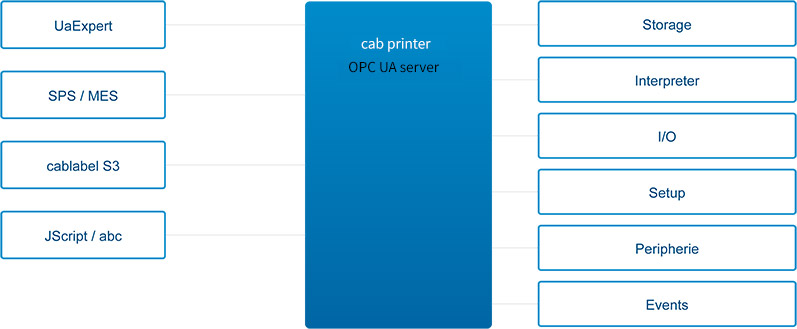
The address space is based on the OPC UA Companion Specifications for Device Integration (DI). cab specific nodes are located under the namespace http://cab.de/Printer/.
Connected in three steps
1
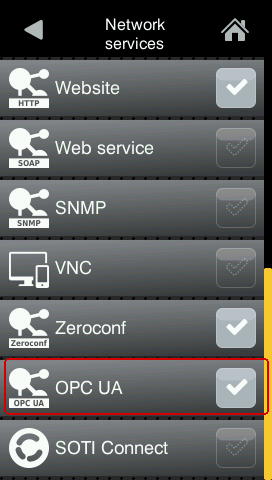
Enable OPC UA on the printer
Printer menue → Setup → Interfaces → Network services. Set OPC UA to ‘Active’.
2
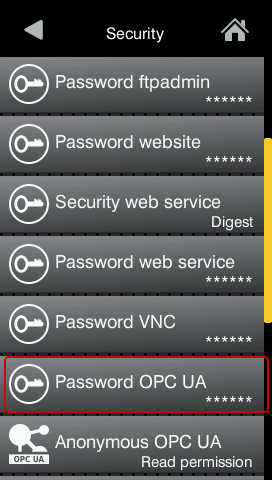
Set a password for OPC UA
Printer menu → Security → Password OPC UA. The OPC UA user is fixed opcuser; You can set your password here.
3
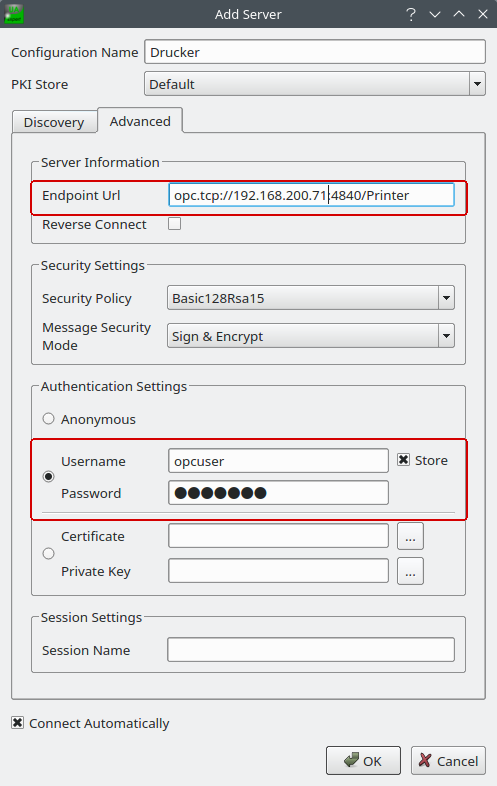
Connect to UaExpert
Endpoint URL opc.tcp:// printer-ip :4840, Login as opcuser using the password you have just set. An encrypted endpoint is recommended.
Get deeper
QUICK GUIDE
cab OPC UA - Quick guide
Instructions by UaExpert: Connect the printer, load the label, change the variable, print.
REFERENCE
cab OPC UA - Reference
All object types, methods, events and setup parameters of the cab OPC UA server.
NODESET
Nodeset XMLs
Original NodeSet2.xml files for importing into your own OPC UA clients.
EXTERNAL MATERIAL
OPC Foundation Companions Specs
Device integration (DI) and related Companions Standards, on which the cab address space is based.
OPC UA is a registered trademark of the OPC Foundation. cab uses free and open-source software in its products — see www.cab.de/opensource.